Published by Alex February 27th, 2008
in news.
We’ve updated our CVS server so you no longer need to obtain a username/password in order to access the MSG source code, so it can now be accessed anonymously. For further details see our CVS page in the Developer section.
We’ve also created an MSG-Users group on Google groups for users to post their feedback, queries, suggestions etc, complimenting our existing MSG Developers group.
Published by Alex January 22nd, 2008
in news.
We’ve just posted up a few short videos which take you through the process of installing an MSG server, as we know that sometimes it can be a little fiddly. These videos are only for people who want to run their own MSG server – to just use MSG you don’t need to install anything!
Basic Installation of MSG:
Integration with Moodle:
Finally a short explanatory video of how the authentication works when you are using the MSG-Moodle block.
Hope these will save some of the headaches people have when trying to install MSG and all feedback on these videos is appreciated
Published by Alex January 18th, 2008
in news.
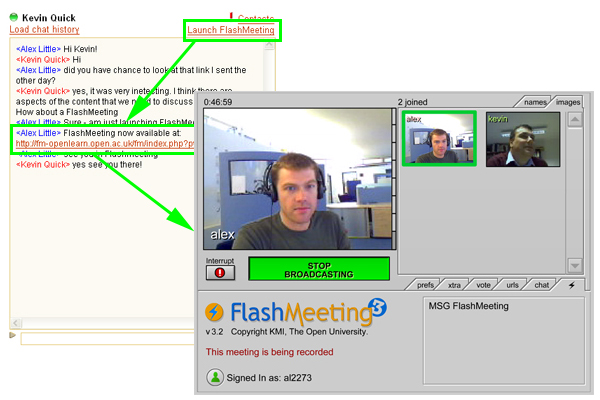
Today on OpenLearn we’ve launched our MSG and FlashMeeting integration, for more info see the OpenLearn website

Published by Alex December 13th, 2007
in news.
We’ve just set up an “MSG Developers” Google Group so if you’re interested in participating in the ongoing development of MSG, or are installing it on your own servers, then please sign yourself up
Published by Alex November 21st, 2007
in news.
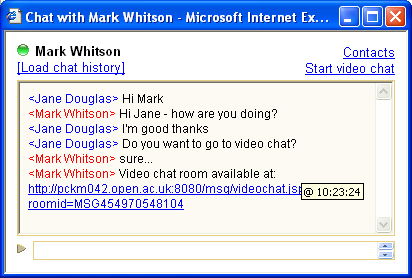
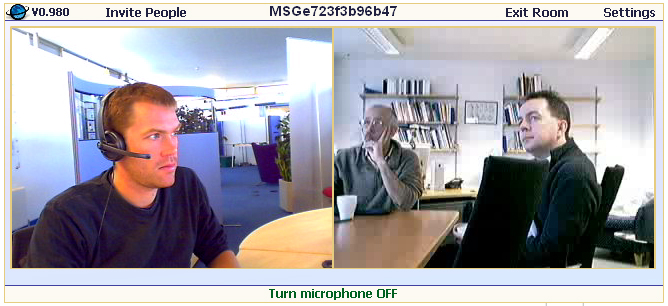
We’ve just added video chat facilities to MSG, currently only on our msg.open.ac.uk server. This facility is provided by MeBeam, although on the OpenLearn MSG server we’ll be using FlashMeeting. To use the service, all you need to do it click on the ‘Start video chat’ link as shown in the images below. Both partipants in the chat will then receive the link to the video chat room in the text chat conversation.


Published by Alex November 21st, 2007
in news.
We’ve recently opened up our msg.open.ac.uk server to allow anyone to register to have a play. To get to the registration from, please visit http://msg.open.ac.uk/msg and click the “Launch MSG” button. You’ll then see the option to register.
Published by Alex November 8th, 2007
in news.
We’ve now updated the MSG netvibes widget so you can now use it to connect to the msg-openlearn server (more info)
Published by Alex November 7th, 2007
in news.
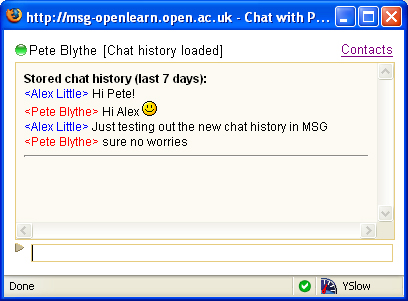
If you’re like me and you close you chat window when you don’t mean to, and lose the conversation, we’ve now got a solution. With the launch of a chat history function on the MSG OpenLearn server, you can recall the last 7 days worth of conversation you’ve had with a given user. You can find the link at the top of the chat window.
For info, the chat history log files are stored in an anonymised form, so only you have access to an identifable version of your chat history, although we may use the anonymised format for research and usage monitoring purposes.
We’re always interested in your feedback, so please let us have any comments/suggestions
Published by Alex September 10th, 2007
in news.
MSG now has the option to view chat history, so no more lost MSG messages and forgotten urls in chats you had the other day. The chat history is currently only available on the msg.open.ac.uk server, but once we’ve tested it further we hope to move this feature over to the msg-openlearn server too. Any feedback on this welcome
Published by Alex August 7th, 2007
in news.
We’ve just created a Netvibes widget for MSG – more details. It’s just a first version at the moment – and so will only work connecting to MSG accounts on the msg.open.ac.uk server, but if the testing goes well, we’ll get it extended to cover msg-openlearn.open.ac.uk server too. Any feedback most welcome (http://groups.google.com/group/msg-users).